AI-assisted debugging is rapidly transforming software development, offering developers powerful tools to identify and resolve code errors with unprecedented speed and accuracy. This guide delves into the intricacies of how AI can enhance the debugging process, from understanding the different types of errors to utilizing various AI-driven strategies. We will explore practical applications, examining real-world scenarios and highlighting the time-saving benefits of AI tools.
This guide will cover the full spectrum of AI-debugging, including introductions to AI models and tools, analyses of common error types, and various debugging strategies. We will also address potential challenges and limitations of AI tools, emphasizing the crucial role of human oversight in the process. Finally, we’ll project the future trends of AI-driven debugging in software development.
Introduction to AI-Assisted Debugging
Artificial intelligence (AI) is rapidly transforming software development, and debugging is no exception. AI-powered tools can significantly enhance the efficiency and effectiveness of identifying and resolving errors in code. These tools leverage machine learning algorithms to analyze code, detect patterns indicative of potential bugs, and even suggest fixes. This approach not only saves developers valuable time but also improves the overall quality of software.AI excels at understanding complex codebases by identifying intricate relationships between different parts of the code.
Traditional debugging methods often struggle with large and intricate codebases, whereas AI-powered tools can effectively traverse and analyze these intricate structures, making sense of their complex logic and relationships. This allows for the detection of subtle errors that might be missed by human inspection. Furthermore, AI can help understand the context of code snippets within the broader program structure, which is critical for accurate diagnosis.
AI Models for Code Analysis
Various AI models are employed for code analysis, each with its strengths and weaknesses. Natural Language Processing (NLP) models are proficient at understanding and interpreting the textual structure of code, allowing for semantic analysis and identification of logical flaws. Machine learning (ML) models, particularly deep learning models, excel at identifying patterns and anomalies in code behavior, leading to more effective bug detection.
These models are often trained on vast datasets of code and bug reports, enabling them to learn the nuances of common errors and potential issues.
AI-Powered Debugging Tools
AI-powered tools are increasingly available to aid in the debugging process. These tools vary in their capabilities, functionalities, and supported programming languages. The table below presents a glimpse into the diverse landscape of AI-assisted debugging tools.
| AI Tool Name | Description | Supported Languages | Key Features |
|---|---|---|---|
| Code Climate | A static analysis tool that uses AI to identify potential code smells and bugs. | JavaScript, Python, Ruby, Java, and others | Automated code review, code quality metrics, and actionable insights for improvement. |
| DeepSource | A cloud-based platform leveraging AI to automate code review and security analysis. | JavaScript, Python, Go, Java, Ruby, PHP, and others | Automated code scanning for bugs, vulnerabilities, and code style issues; supports integration with CI/CD pipelines. |
| GitHub Copilot | An AI pair programmer that suggests code completions and provides alternative implementations. | Python, JavaScript, Go, C++, and others | Code generation, improved developer productivity, and code suggestions based on context. |
| Codacy | A platform that integrates with various code repositories to provide automated code reviews and quality checks using AI. | Multiple programming languages | Automated code analysis, vulnerability detection, code coverage, and insights into code complexity. |
Identifying Code Errors with AI
AI-powered debugging tools can significantly accelerate the process of identifying and resolving code errors. By leveraging sophisticated algorithms and vast datasets, these tools can pinpoint the root cause of issues, often in a fraction of the time it takes a human developer. This allows developers to focus on more complex aspects of the development process.
Types of Errors AI Can Detect
AI tools can analyze code to detect various types of errors, including syntax errors, logical errors, and runtime errors. These errors can significantly impact the functionality and reliability of software. Understanding the different types of errors AI can identify allows for more targeted and effective debugging.
- Syntax Errors: These errors violate the grammatical rules of the programming language. They often result from incorrect use of s, operators, or punctuation. AI tools excel at identifying these errors, flagging the specific line and highlighting the issue.
- Logical Errors: These errors arise from flaws in the program’s logic. The code may compile and run without producing syntax errors, but it doesn’t perform the intended function. AI can help by identifying inconsistencies in the program’s flow or unexpected outputs.
- Runtime Errors: These errors occur during the execution of the program. They can be caused by various factors, such as attempting to divide by zero, accessing invalid memory locations, or encountering unexpected input data. AI tools can analyze the program’s behavior during runtime to identify the specific conditions leading to the error.
Code Snippets Demonstrating Errors
The following code snippets illustrate various types of errors AI can identify:
- Example 1 (Syntax Error):
“`java
int x = 10;
y = x + 5; // Missing declaration for variable y
System.out.println(y);
“`
The AI will pinpoint the missing declaration of the variable `y`. - Example 2 (Logical Error):
“`java
int sum = 0;
for (int i = 1; i <= 10; i++) sum = sum + i; // Incorrectly assigns sum to sum + i each iteration. System.out.println(sum); // Output will be incorrect ``` The AI can detect the issue of incorrectly updating the sum variable within the loop. The expected output is 55, but the actual output might be different due to the logic error. - Example 3 (Runtime Error):
“`java
int result = 10 / 0;
System.out.println(result);
“`
The AI will flag the division by zero as a runtime error, as it’s an invalid operation.
Analyzing Code for Debugging Patterns
AI tools can analyze code snippets to identify common debugging patterns. These patterns can help pinpoint the root cause of errors more quickly. This analysis allows the AI to provide tailored suggestions for debugging.
- Method: AI tools often use techniques like static analysis (analyzing the code without executing it) and dynamic analysis (analyzing the code during execution) to identify potential errors and their causes.
Interpreting AI-Generated Explanations
AI-generated explanations of error locations are often presented in a clear and concise format. The explanations typically highlight the specific line or block of code where the error occurs and describe the nature of the problem. These explanations are often presented with context to help the user understand the issue. This format helps developers quickly understand and resolve the error.
Table of Error Types, Descriptions, Examples, and AI Explanations
| Error Type | Description | Example Code Snippet | AI-Generated Explanation |
|---|---|---|---|
| Syntax Error | Incorrect syntax in the code. | “`javaint x = 10;y = x + 5;“` | Variable ‘y’ is used without a declaration. Declare ‘y’ before use. |
| Logical Error | Incorrect logic in the code. | “`javaint sum = 0;for (int i = 1; i <= 10; i++) sum = sum; //Incorrect assignment ``` | The variable ‘sum’ is not being updated correctly within the loop. The loop should add the value of ‘i’ to ‘sum’. |
| Runtime Error | Error occurs during program execution. | “`javaint result = 10 / 0;“` | Division by zero detected. The program cannot divide by zero. |
AI-Driven Debugging Strategies
AI is rapidly transforming software development, and debugging is no exception. AI-powered tools are increasingly capable of analyzing code, identifying potential issues, and even suggesting fixes, significantly accelerating the debugging process. This approach leverages sophisticated algorithms to understand code structure, logic, and potential error patterns, going beyond simple syntax checks.These AI-driven strategies not only pinpoint errors but also predict potential problems before they manifest during runtime.
This proactive approach reduces the time spent on debugging and increases the overall efficiency of software development. By incorporating AI into the debugging workflow, developers can focus on higher-level tasks and create more robust and reliable software.
Code Walkthroughs and Static Analysis
AI-powered code walkthroughs simulate the execution of code, tracing variables and function calls to identify potential errors. This dynamic analysis, often coupled with static analysis, provides a comprehensive view of the code’s behavior. Static analysis examines the code’s structure and syntax without executing it, detecting potential issues like type errors, undefined variables, and potential vulnerabilities. Combining these approaches allows for a more thorough examination of the code’s correctness and efficiency.
Predicting Potential Issues
AI can predict potential runtime errors by analyzing code patterns and historical data. For example, if a specific code sequence consistently leads to memory leaks in past projects, AI can flag that sequence in new code, alerting developers to a potential problem before it occurs. This proactive approach can significantly reduce the risk of crashes and unexpected behavior.
Real-world examples include identifying potential data race conditions in concurrent code or predicting potential null pointer exceptions.
Comparison of AI Approaches
Different AI approaches to debugging vary in their strengths and weaknesses. Machine learning models, trained on large datasets of code and bug reports, can identify patterns and predict potential issues with high accuracy. Deep learning models, with their ability to learn complex relationships, can provide more sophisticated analysis, but often require significant computational resources. Rule-based systems, while simpler, excel in detecting known errors and violations of coding standards.
Strengths and Weaknesses of AI-Based Debugging Tools
AI-powered debugging tools offer significant advantages, such as increased speed and efficiency, but they also have limitations. Some tools excel at identifying specific types of errors, while others may struggle with complex or novel code. The strengths of a tool depend on its underlying algorithms and the specific dataset used for training. Limitations include potential inaccuracies, especially in handling unique or unconventional code structures.
The training data also significantly influences the quality of the results.
AI-Driven Debugging Tools
AI-driven debugging tools are rapidly emerging, offering a range of capabilities. These tools often combine various techniques, such as code analysis, machine learning, and natural language processing. Their ability to automate the debugging process frees developers to focus on more complex tasks and create high-quality software.
Table of AI-Driven Debugging Tools
| Debugging Tool | Type of Analysis | Key Capabilities | Limitations |
|---|---|---|---|
| CodeGuru | Static & Dynamic Analysis | Identifies bugs, performance bottlenecks, and security vulnerabilities in AWS code. | Limited to AWS-specific code and services. |
| DeepSource | Static Analysis | Detects bugs, security vulnerabilities, and style issues in various programming languages. | May not be effective for very complex code structures. |
| SonarQube | Static Analysis | Provides code quality metrics, detects bugs, and helps improve code maintainability. | Requires a separate installation and setup. |
| GitHub Copilot | AI-assisted coding | Suggests code completions and refactoring suggestions, but not dedicated debugging. | May produce incorrect or inefficient code suggestions in some cases. |
Practical Applications of AI in Debugging
AI-assisted debugging is rapidly evolving, offering developers powerful tools to streamline the error-finding process. This approach leverages machine learning algorithms to analyze code, identify potential issues, and even suggest solutions, significantly accelerating the development cycle. These tools are not just theoretical concepts; they are already transforming how software is built and maintained.
Real-World Scenarios
AI-powered debugging tools are proving valuable in diverse contexts. For instance, in large-scale enterprise applications, where intricate codebases can house thousands of lines of code, these tools can quickly pinpoint complex bugs that would otherwise take weeks or even months to identify. Furthermore, in the realm of web applications, AI can assist in debugging issues related to performance bottlenecks or unexpected user behavior.
In short, AI is increasingly a vital asset in the arsenal of every software developer.
Improving Developer Productivity
AI debugging tools can significantly enhance developer productivity by automating repetitive tasks and focusing their attention on the most crucial aspects of the debugging process. By automatically analyzing code for potential errors, AI can save developers valuable time that they can then invest in more strategic tasks. For example, an AI tool can analyze a complex system for potential security vulnerabilities, helping teams to address them proactively before they become real issues.
Automation of Debugging Tasks
AI tools can automate several aspects of the debugging process. This automation includes identifying potential errors in code based on patterns and historical data, suggesting fixes for identified issues, and even generating test cases to validate the effectiveness of those fixes. For instance, an AI tool can automatically generate unit tests for a newly added function, ensuring that the function behaves as expected in different scenarios.
Practical Debugging Example
Consider a runtime error where a program crashes with an “IndexError: list index out of range” error. An AI debugging tool can analyze the code surrounding the error, such as loops and conditional statements, and pinpoint the specific line where the list index is being accessed beyond the valid range. This is often a simple oversight that would be difficult to spot manually, but an AI tool can automatically identify the root cause and suggest fixes.
The tool might highlight a particular loop that’s iterating one element too many times or a conditional statement that’s not properly handling edge cases.
Steps to Use an AI Tool for Runtime Error Identification
- Identify the runtime error. The first step is to pinpoint the specific error message, such as the “IndexError: list index out of range” error mentioned above.
- Provide the code snippet. The AI tool needs the relevant portion of the code where the error occurs.
- Run the analysis. Submit the code snippet to the AI tool for analysis.
- Review the suggestions. The tool will analyze the code and suggest possible fixes.
- Implement the fix. Implement the suggested fix and retest the code.
Table of AI Debugging Tool Use Cases
| Project Type | Codebase Complexity | AI Tool Used | Debugging Time Savings |
|---|---|---|---|
| Mobile Application | Medium | CodeGuru | Estimated 20-30% reduction |
| Web Application | High | DeepCode | Estimated 15-25% reduction |
| Data Processing Pipeline | Very High | GitHub Copilot | Estimated 40-50% reduction |
| Embedded System | Low | IntelliJ IDEA | Estimated 10-20% reduction |
Enhancing Debugging Experience with AI
AI-powered debugging tools are revolutionizing the way developers approach code errors. Moving beyond basic error identification, these tools are now equipped to provide a richer, more intuitive experience, streamlining the debugging process and reducing the time spent on troubleshooting. This enhanced experience empowers developers to not only find errors but also understand their root causes and implement effective solutions.
Improved Debugging Workflow
AI significantly enhances the debugging workflow by automating tasks, providing context-sensitive insights, and offering proactive solutions. Instead of relying solely on error messages, developers can benefit from a more holistic approach to problem-solving. This translates into faster resolution times and a reduced likelihood of introducing new errors during the debugging process. The automation offered by AI-powered tools can streamline repetitive tasks, freeing up developers to focus on higher-level problem-solving.
Context-Sensitive Explanations
AI tools provide context-sensitive explanations, which are crucial for understanding the intricate details of the error. These explanations consider the surrounding code, its intended functionality, and potential dependencies, offering a more nuanced understanding of the error’s source and impact. Instead of simply pointing to a line of code, AI can explain why a particular section might be problematic within the broader context of the program.
This improved comprehension empowers developers to quickly pinpoint the source of the issue and implement accurate fixes.
Suggested Fixes and Alternative Implementations
AI can go beyond simply identifying errors; it can also suggest potential fixes or alternative code implementations. This proactive approach saves valuable time and effort by offering a range of possible solutions, which developers can then evaluate and select the most appropriate one for their specific needs. This not only reduces debugging time but also encourages developers to explore alternative approaches, leading to more robust and efficient code.
Understanding AI’s Reasoning
AI-powered tools often provide insights into the reasoning behind their suggestions for code improvements. This transparency is critical for building trust and ensuring developers understand the rationale behind the proposed solutions. Developers can examine the logic behind the AI’s suggestions, verifying their accuracy and understanding the potential impact on the codebase. This transparency allows developers to learn from the AI’s insights and improve their own coding skills.
This also allows for a more effective learning curve for the user and encourages continuous improvement.
Example: AI Tool Providing Debugging Insights
Consider a hypothetical AI debugging tool, “CodeWise,” that analyzes code and identifies potential errors. CodeWise identifies a `TypeError` in a line of code related to a calculation. It doesn’t simply point to the error; instead, it provides a comprehensive explanation, noting the data types involved and suggesting the use of type casting. CodeWise also suggests alternative implementations that use a different approach to handling potential null values.
“Error Analysis: TypeError detected in line 25: ‘Cannot perform addition on string and integer.’ Potential Cause: The variable ‘data’ is being treated as an integer in the calculation, but it is currently a string. Suggested Fix: Cast the ‘data’ variable to an integer using `int(data)` before the calculation. Alternative Implementation: Use a conditional check to handle potential null values, preventing the error.”
Challenges and Limitations of AI in Debugging
AI-assisted debugging tools offer promising solutions, but they also present unique challenges. These limitations, while not insurmountable, must be understood to effectively leverage these tools and ensure accurate results. A careful consideration of potential biases, integration difficulties, and the crucial role of human oversight is paramount for successful implementation.AI-driven debugging, while often faster and more comprehensive than traditional methods, is not a perfect replacement for human expertise.
Understanding its limitations and addressing them through careful validation and human oversight is key to leveraging its potential without compromising accuracy.
Potential Limitations and Biases in AI Tools
AI debugging tools learn from vast datasets of code and errors. However, these datasets might reflect existing biases or limitations in the codebase itself. For instance, if a particular programming style or coding pattern is consistently associated with errors in the training data, the AI might incorrectly flag similar code as problematic even if it’s functionally correct. Furthermore, the AI might struggle with complex, nuanced error scenarios or code that deviates significantly from the patterns it has learned.
Bias in the training data can lead to inaccurate or unfair debugging suggestions.
Challenges in Integrating AI Tools into Existing Workflows
Integrating AI debugging tools into existing software development workflows requires careful planning and execution. Compatibility issues with existing IDEs, version control systems, or other development tools can hinder seamless integration. Training developers on how to effectively use these new tools and interpret their output is also crucial. Furthermore, the need to adapt existing codebases to the AI’s specific input formats and requirements can be time-consuming and potentially disruptive.
Integrating AI tools must be approached with a phased strategy to minimize disruptions and maximize efficiency.
Importance of Human Oversight in AI-Assisted Debugging
Human oversight remains essential in AI-assisted debugging. While AI tools can identify potential issues and suggest solutions, they cannot fully replace the judgment and context provided by human developers. AI-generated suggestions should be thoroughly examined and validated by human developers. The AI may misinterpret context or fail to account for specific project requirements, so human scrutiny is necessary to ensure accuracy and prevent errors.
Need for Ongoing Validation of AI-Generated Debugging Suggestions
AI debugging tools are constantly evolving, and their suggestions need ongoing validation. The accuracy of AI-generated debugging suggestions can vary depending on the complexity of the code, the nature of the error, and the specific context of the project. Continuous evaluation and feedback loops are vital to ensure the tools remain effective and provide reliable guidance. Regular testing and feedback from developers are necessary to refine the AI’s capabilities and address any shortcomings.
Comparison of AI-Driven Debugging with Traditional Methods
Traditional debugging often involves manual inspection of code, stepping through execution, and setting breakpoints. AI-driven debugging, in contrast, leverages machine learning algorithms to analyze code and identify potential issues proactively. AI tools can analyze vast amounts of code much faster than a human, making them efficient in finding errors in large codebases. However, traditional methods provide greater control and insight into the specific error, making them valuable for understanding the root cause.
Challenges in AI-Debugging: A Table
| Challenge | Description | Mitigation Strategy | Example |
|---|---|---|---|
| Bias in Training Data | AI tools might incorrectly flag code based on biased training data. | Use diverse and representative datasets for training. Regularly audit and update training data. | An AI incorrectly flags a style of coding common in a specific team, but not a widespread issue. |
| Integration Complexity | Integrating AI tools into existing workflows can be challenging. | Choose tools compatible with existing infrastructure. Phased implementation and thorough testing. | An AI debugging tool that is not compatible with the existing IDE. |
| Over-reliance on AI | Developers may over-rely on AI, potentially overlooking crucial details. | Emphasize human oversight and validation of AI suggestions. Provide training on when and how to use AI tools. | A developer accepts an AI suggestion without verifying it in context. |
| Lack of Contextual Understanding | AI tools might misinterpret the context of the code. | Provide additional context to the AI through documentation or comments. Emphasize human verification. | An AI suggests a fix that doesn’t account for a specific business rule. |
Future Trends in AI-Driven Debugging
The field of software development is constantly evolving, and AI is poised to play an increasingly crucial role in shaping its future. As AI algorithms mature and gain access to larger datasets, the potential for AI-assisted debugging to significantly improve the efficiency and accuracy of the software development lifecycle is substantial. This section explores the exciting future directions of AI in debugging, focusing on its potential to enhance the entire software development process.
Predictive Debugging
AI tools can analyze historical debugging data and code patterns to predict potential errors before they manifest. By identifying code sections prone to specific types of errors, developers can proactively address vulnerabilities and refine their code. This predictive capability will streamline the development process by reducing the time spent on debugging and enabling earlier error detection. For instance, AI could flag potential null pointer exceptions in C++ code based on past debugging experiences and identify patterns in similar code sections.
This proactive approach allows developers to address potential issues before they impact the overall functionality of the application.
AI-Enhanced Code Analysis for Large Codebases
Analyzing large and complex codebases presents significant challenges for traditional debugging methods. AI can overcome these limitations by automatically identifying and categorizing code components, dependencies, and potential vulnerabilities within vast code repositories. This capability is especially valuable for legacy systems or open-source projects with intricate structures. Sophisticated AI models can parse code structure, identify potential conflicts, and highlight critical areas needing attention.
This will significantly enhance the debugging process for complex projects, enabling faster identification and resolution of errors.
Integration into the Software Development Lifecycle (SDLC)
The future of AI-driven debugging extends beyond simply identifying errors; it aims to seamlessly integrate into the entire software development lifecycle. AI tools can analyze code during the design and development phases, providing feedback on potential issues and suggesting improvements. This proactive approach can minimize the occurrence of bugs and improve the overall quality of software products. For instance, AI tools can automatically generate test cases based on code analysis, identifying potential failure points before they impact end-users.
Table: Future Trends in AI-Driven Debugging
| Trend | Description | Potential Impact | Challenges |
|---|---|---|---|
| Predictive Debugging | AI tools analyze historical debugging data and code patterns to predict potential errors before they occur. | Reduced debugging time, improved code quality, proactive error detection. | Requires large datasets for training, potential for false positives, maintaining accuracy with evolving code styles. |
| AI-Enhanced Code Analysis for Large Codebases | AI analyzes complex codebases to identify potential vulnerabilities and critical areas requiring attention. | Improved efficiency in debugging complex projects, reduced manual effort, better understanding of code structure. | Scalability of AI models for extremely large codebases, ensuring accuracy in complex code interactions, potential for biased results from limited data. |
| Integration into the SDLC | AI tools are integrated into the entire software development process to provide feedback on code quality and suggest improvements throughout the lifecycle. | Increased code quality, proactive issue detection, streamlined development process, early bug identification. | Integration complexity, potential for developer resistance to new tools, ensuring data privacy and security within the development environment. |
| Automated Error Prevention | AI tools predict and prevent errors before they occur by identifying potential code flaws and vulnerabilities. | Improved software reliability, reduced maintenance costs, enhanced user experience. | Determining the root cause of complex errors, maintaining accuracy in dynamic code environments, ensuring fairness in AI-generated suggestions. |
Outcome Summary
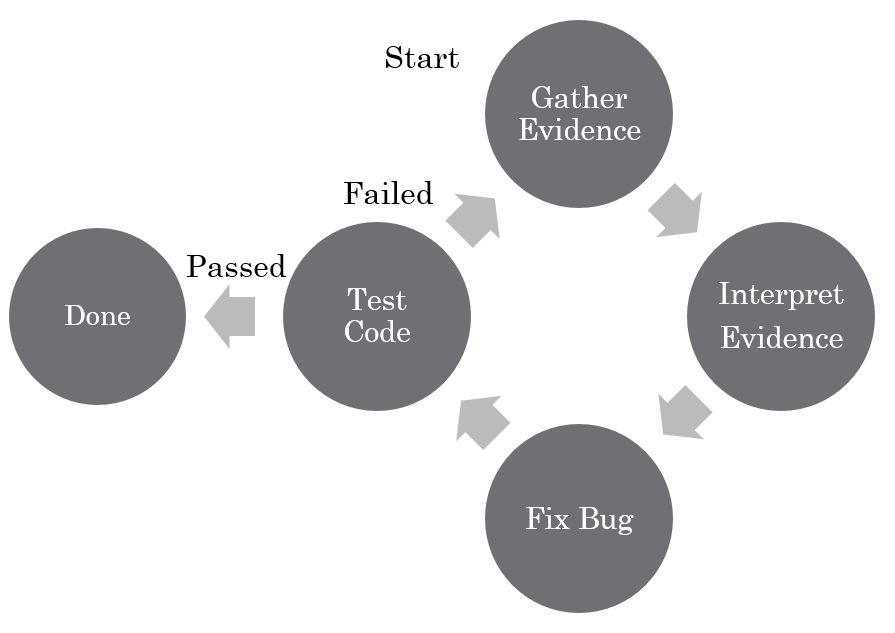
In conclusion, this exploration of AI-assisted debugging reveals a significant advancement in software development practices. By understanding the potential and limitations of AI tools, developers can leverage these technologies to enhance their workflow, improve code quality, and ultimately, build better software. The future of debugging is undeniably intertwined with AI, and this guide provides a solid foundation for embracing this transformative technology.